On-site scanning with barcodes or QR codes.
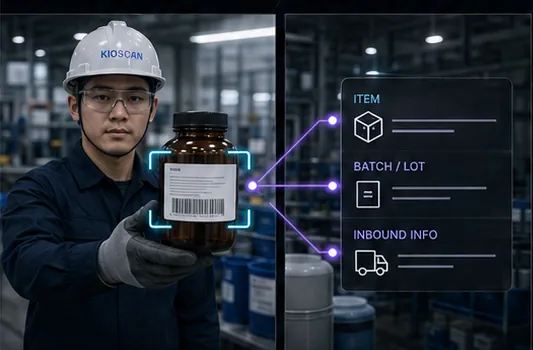
Items are identified by scanning the code already on them. Which formats can be read is confirmed against the labels actually in use.
02 / INVENTORY MANAGEMENT
Scan a barcode or QR code where the material is, and handle inbound, outbound, and relocation at the kiosk. Nobody re-enters the same data back at the office.
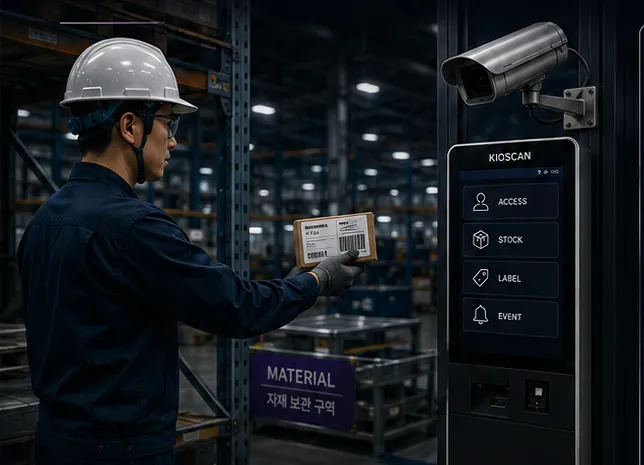
Items are identified by scanning the code already on them. Which formats can be read is confirmed against the labels actually in use.
Transaction type, quantity, and time are captured together, so you can see when material moved and in which direction.
Because it is handled at the point of work, the step of copying the same information again at a desk is reduced.
Per-item history reads as a continuous sequence, making it clear which task drove a change in stock.
Stock records live in the same structure as access and label records. Integration with an existing system is scoped during the site assessment.
A slot for the film covering on-site scanning through to the stock record.
Video pending
Add the video and caption files at the paths below and playback appears here.
Replace at
Inventory management feature film
A slot for footage of item scanning and inbound/outbound handling at the kiosk.
All video is muted by design, and every slot carries a caption track so nothing depends on sound.
How checking an item turns into a stock history.
The operator presents the item label or barcode to the camera.
The identified item is linked to item registration or inbound data.
Inbound, outbound, or relocation is completed at the kiosk.
Managers review material movement and stock changes on one screen.
Open the field scene, the kiosk screen, and the result view at a larger size.
The inventory management layout at its original aspect ratio. Concept material, not a delivered project.
Share your label format, daily volume, and what you need to verify, and we will map out a configuration together.
Your details are used only to answer this inquiry. Nothing is written to a database — the message is forwarded to our inbox and then discarded.