INDUSTRIAL FIELD OPERATION KIOSK

KIOSCANKIOSCAN product overview

The moment a camera detects it,the kiosk passes the situation onstraight away.

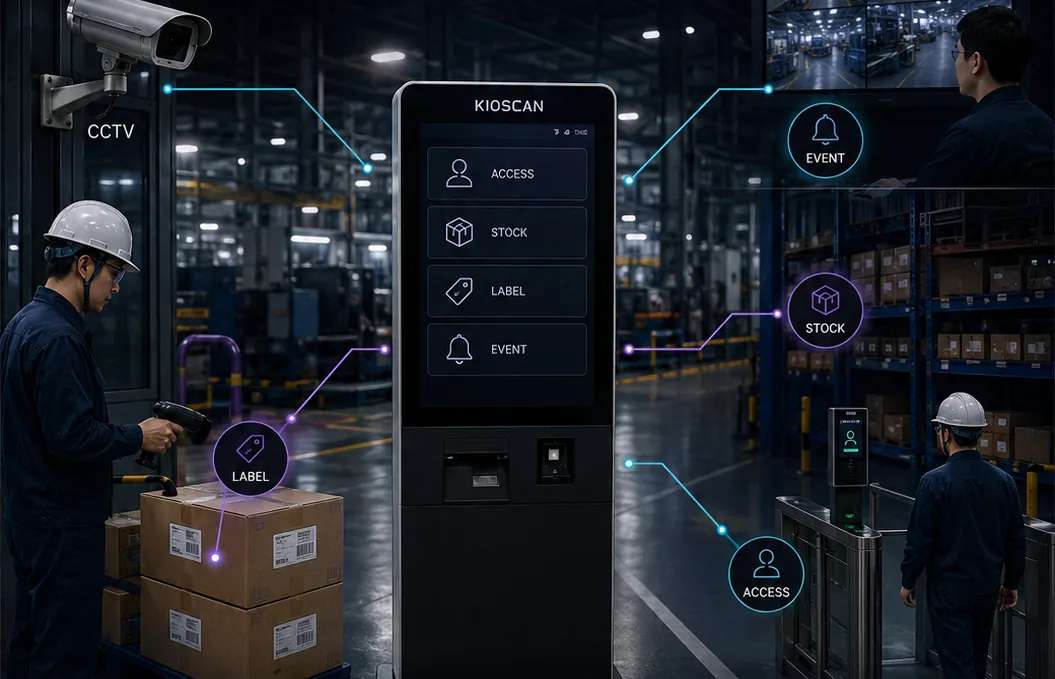
Access control, inventory, label recognition, and incident monitoring —check it on site and respond on the spot.

  • ACCESSAccess control
  • STOCKInventory management
  • EVENTSite monitoring
  • LABELLabel recognition
Concept image of a KIOSCAN kiosk in a dimly lit industrial aisle, connected by data lines to a wall camera, control monitors, a worker scanning cartons, and an entry gate
Concept VisualizationCAM 01 · FIELD LINE

CORE FLOW

Four stages,from camera to control.

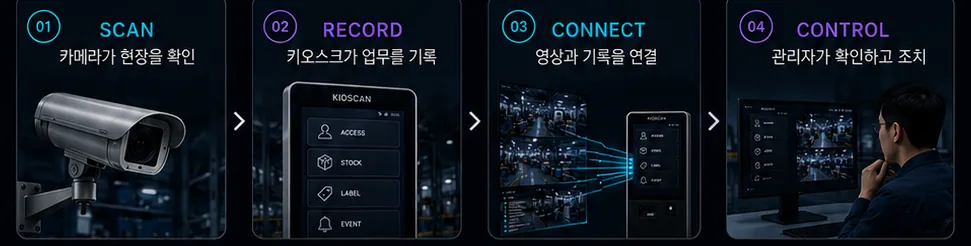
Field input is captured, recorded, connected to related data, and surfaced on the manager view. Intelligent detection is not a prerequisite for this flow — it is an optional module chosen per site.

  1. 01
    CAMERA / FIELD INPUT

    Field input

    Existing CCTV and NVR, mobile capture, and cameras added only where they are needed provide the site video and input.

  2. 02
    DETECT OR RECORD

    Detect or record

    Operators complete a task at the kiosk, or a selected detection module flags a configured event.

  3. 03
    CONNECT DATA

    Connect data

    The moment it happened, the related footage, and the access, inventory, and label records are linked into one history.

  4. 04
    OPERATIONAL CONTROL

    Operational control

    Managers review the events and status that matter, then decide the next step.

Four-stage flow diagram: camera check, kiosk record, linking video to records, and manager review
Concept Visualization

Intelligent detection modules are not standard in every configuration. Availability depends on site conditions and selected modules.

CORE SOLUTIONS

Four field workflows,one operating flow.

Start with the capability you need most. Each one runs on its own, yet they share the same record structure and the same manager view.

01 / ACCESS

Access Control

Confirm who is on site before work starts.

Operators enter access and work status at the kiosk, and managers see who is currently on site. The moment of entry is stored alongside the related record.

  • Access and work status entry
  • Current headcount on site
  • Pre-start verification steps
  • Entry time linked to records
Concept image of a worker in a hard hat touching the access entry screen of a KIOSCAN kiosk installed on site
Concept Visualization
02 / STOCK

Inventory Management

The record starts the moment an item is checked.

Scan a barcode or QR code on site and handle inbound, outbound, and relocation at the kiosk. Material movement and the related data stay together.

  • On-site barcode and QR scanning
  • Inbound, outbound, and move records
  • Field entry through the kiosk
  • Visibility into material movement
Concept image of a worker in a material storage area presenting a carton label to a KIOSCAN kiosk camera
Concept Visualization
03 / EVENT

Site Monitoring

Real-time site monitoring, organised around events.

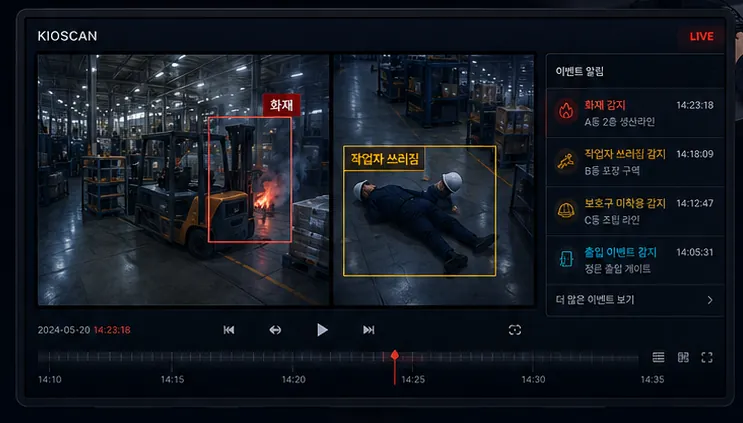
Bring existing video sources into one view and work from the events that need attention. Intelligent detection is configured according to site conditions and selected modules.

  • Existing video sources in one view
  • Event-centred records and lookup
  • Event time linked to footage
  • Optional intelligent detection modules
Concept image of a KIOSCAN control screen with two camera feeds, an event alert list, and a timeline
Concept Visualization
04 / LABEL

Label Recognition

Reading the label is only the first step.

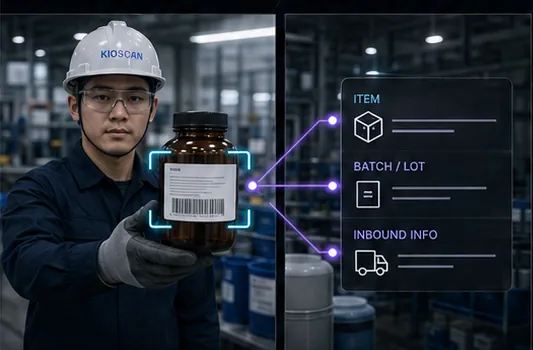
Label and barcode patterns are recognised to support item registration and inbound data mapping. On-site label printing is an optional add-on where a site needs it.

  • Label and barcode pattern recognition
  • LOT and inbound data mapping
  • Item registration support
  • Optional on-site label printing
Concept image of a worker holding a labelled container toward a camera while item, LOT, and inbound fields connect by data lines
Concept Visualization

WHY KIOSCAN

Keep the cameras you have.Connect what you need first.

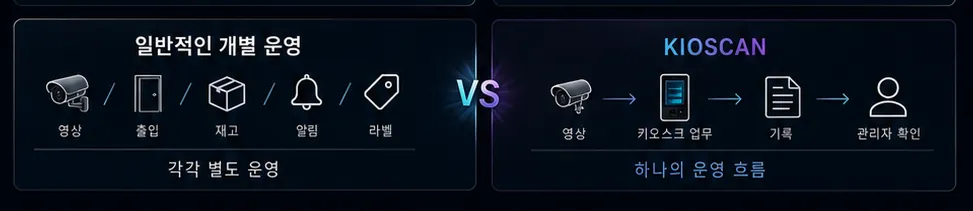
We look to your existing CCTV and NVR infrastructure first to keep the initial investment down, then determine the actual integration scope and any additional equipment through an on-site assessment.

Equipment is not the starting point. We review the video devices and network already in service, along with how your teams actually work, before deciding how far the integration can reach.

Diagram comparing video, access, stock, alerts, and labels running separately against the same functions connected as one KIOSCAN operating flow
Concept Visualization
  • Work with the cameras already installed.

    Existing CCTV and NVR are assessed as video sources, so a full camera replacement is never assumed as a precondition. The usable scope is confirmed during the site assessment.
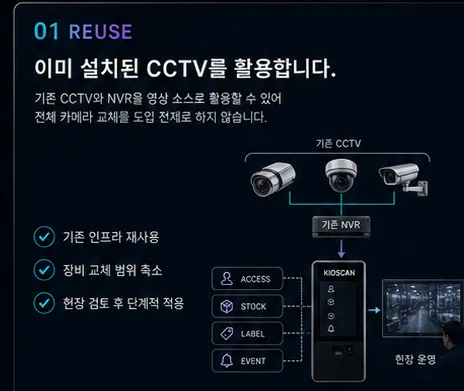
    Diagram showing three existing cameras and an NVR routed through a kiosk into the field operation view
    Concept Visualization
  • Add cameras only where they are needed.

    Zones that need additional analysis are selected deliberately, and temporary work areas can be covered with mobile capture.
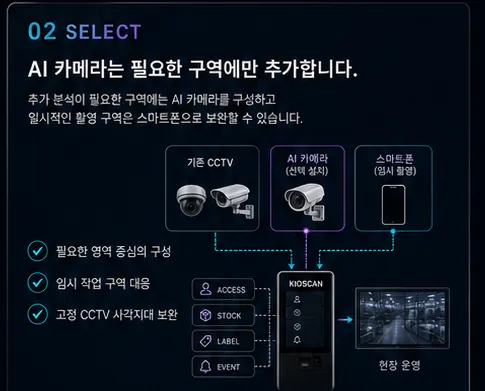
    Diagram showing existing CCTV, an added camera, and mobile capture each feeding into the kiosk
    Concept Visualization
  • Sites with restricted internet access can be reviewed.

    With your network and security policy confirmed, an on-premise or intranet-centred configuration can be considered. The applicable scope is decided after the assessment.
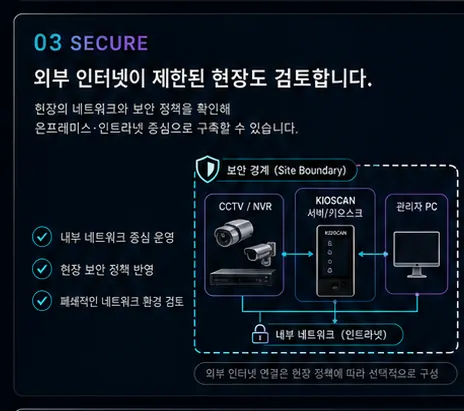
    Diagram of cameras, an NVR, a server-side kiosk, and an administrator PC connected inside a marked security boundary
    Concept Visualization
  • Configure around how the site already works.

    Event conditions, kiosk screens, management fields, label formats, and notification methods are configured to match the work in front of you.
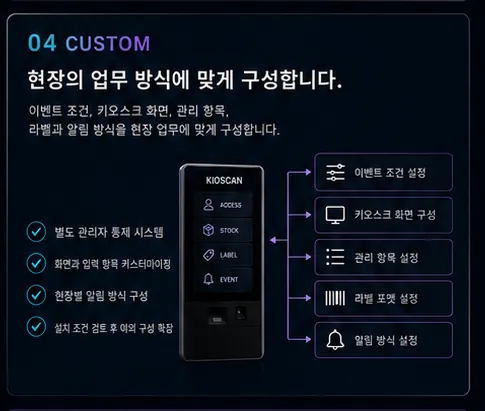
    Diagram of a kiosk linked to event condition, screen layout, management field, label format, and notification settings
    Concept Visualization

SYSTEM ARCHITECTURE

From the video sourceto the manager view.

Data passes through four layers, turning field input into an operating record.

  1. LAYER 01
    VIDEO & FIELD INPUT

    Video and field input

    The devices that already watch the site provide video and input.

    • Existing CCTV and NVR
    • Mobile capture
    • Additional cameras (optional)
  2. LAYER 02
    FIELD KIOSK

    Field kiosk

    Operators complete the work they need to do, where they are.

    • Access and work status entry
    • Item registration, inbound, outbound
    • Stock relocation
    • Label recognition
  3. LAYER 03
    CONNECTED RECORDS

    Data connection engine

    Event time is linked to the field work record.

    • Event timestamp
    • Related footage
    • Access and stock records
    • Label data
  4. LAYER 04
    ADMIN CONTROL

    Manager view

    Managers review what needs attention and respond.
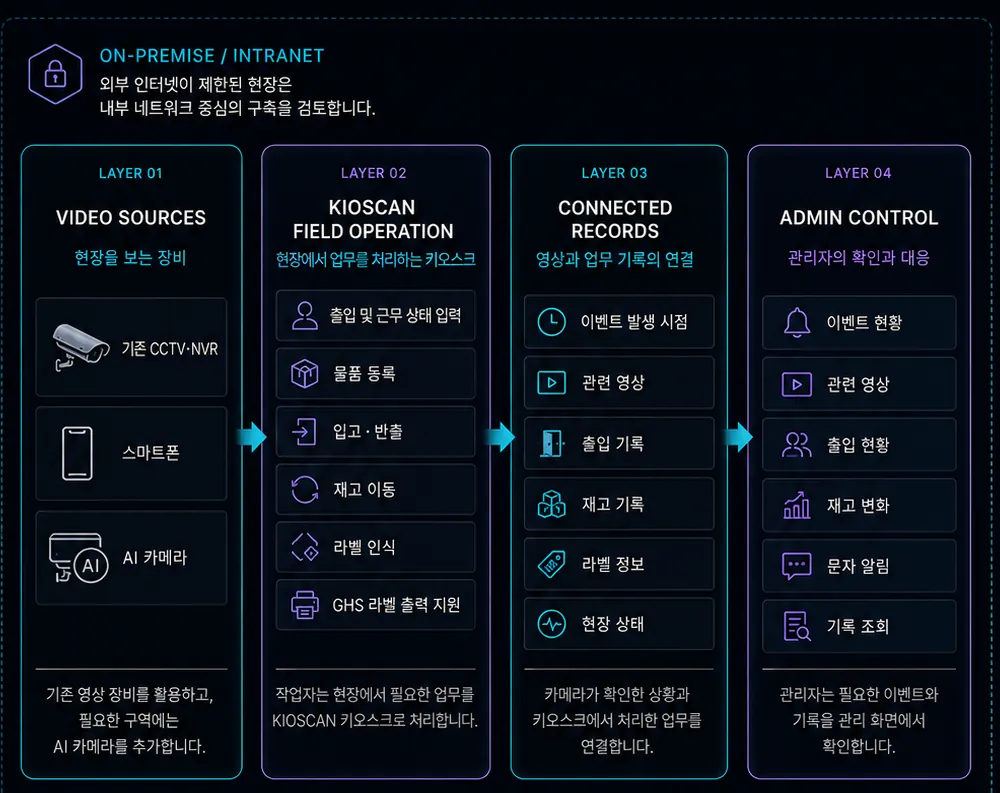
    • Event status
    • Access status
    • Stock movement
    • Record lookup
Four-layer system architecture diagram: video sources, kiosk field operation, connected records, and admin control
Concept Visualization
Flow diagram from camera, mobile, and camera input through kiosk field work to connected records and manager review
Concept Visualization

The actual equipment and network configuration is decided after reviewing site conditions and existing infrastructure.

DEPLOYMENT PROCESS

We do not lead with hardware.We start with the work.

The build scope is set after reviewing the site, the existing cameras, how operators work, and what managers need to verify.
  1. Inquiry

    • Industry and work zones
    • The capabilities you need first
    • Existing video infrastructure
  2. Site and process review

    • What operators handle day to day
    • What managers need to verify
    • How the work actually flows
  3. Integration assessment

    • Usable scope of existing CCTV and NVR
    • Network and security environment
    • Whether extra equipment is required
  4. Configuration and demo

    • Kiosk task screens
    • Management fields and notifications
    • Label formats and event conditions
  5. Build and operation

    • On-site installation and verification
    • User walkthrough and handover
    • Adjustments for live operation
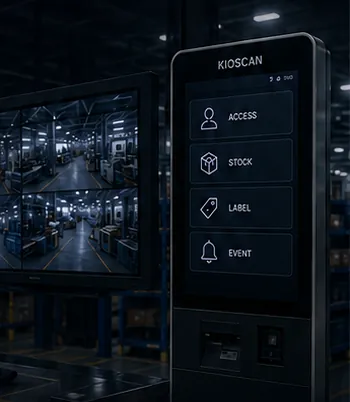
Concept image of a KIOSCAN kiosk menu screen standing beside control room monitors
Concept Visualization

Timeline and cost depend on the resulting configuration, so both are shared separately once the assessment is complete.

SOLUTION FILM

The whole solution,in one film.

From camera input to manager review — how KIOSCAN behaves on a live site, in a single piece.

Video pending

Add the video and caption files at the paths below and playback appears here. Nothing autoplays, and the clip starts muted.

Replace at

  • public/assets/videos/kioscan-overview.mp4
  • public/assets/videos/kioscan-overview.webm
  • public/assets/videos/kioscan-overview.ko.vtt
  • public/assets/videos/kioscan-overview.en.vtt
16:9 frameConcept Visualization

KIOSCAN solution overview film

A slot for the film covering the full flow: reviewing site video, handling work at the kiosk, connecting records, and manager review.

All video is muted by design, and every slot carries a caption track so nothing depends on sound.

CONCEPT ARCHIVE

Brochure concept material

Review the KIOSCAN concept brochure layouts at their original aspect ratio. All of them are concept visualizations created to explain capabilities — none is a delivered project.

CONTACT

Start by checking whetherit fits your site.

Tell us how your site is set up and what you want to verify. A member of our team reviews the details and replies directly. Your message is used only to answer it.
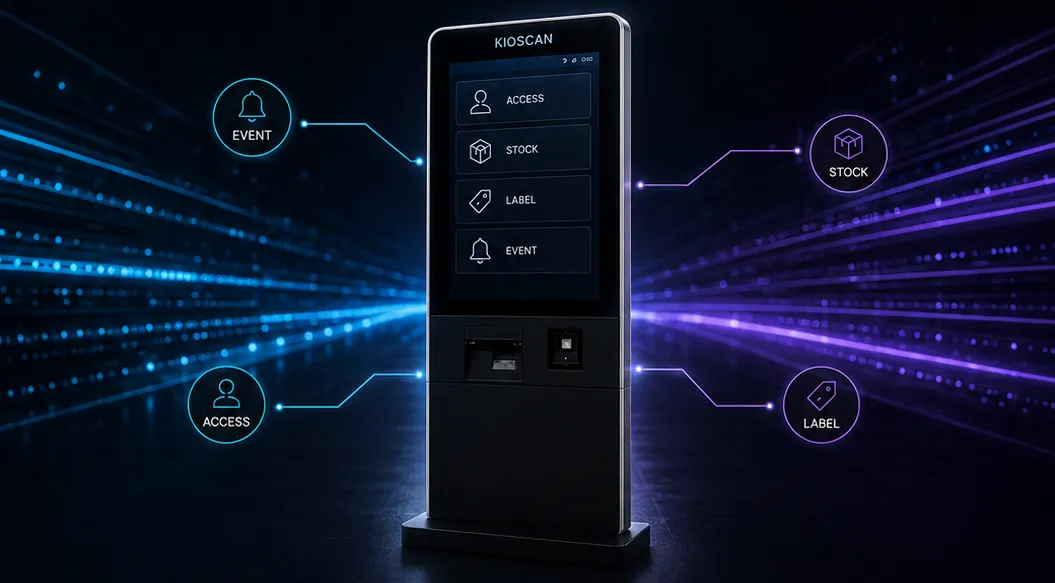
KIOSCAN brochure closing layout — kiosk-centred data connection visual with consultation topicsConcept Visualization

How to reach us

Web inquiry formComplete the fields below and our team will pick it up.
danswer.company@gmail.comWriting to us directly reaches the same inbox.

Required detailsMarked fields are required.

Any format is fine, including an international dialling code.

Inventory Management

Optional detailsOptional fields can be left blank.
Read the privacy policy

Your details are used only to answer this inquiry. Nothing is written to a database — the message is forwarded to our inbox and then discarded.